

PowerShell 版本
1、按照片原始拍摄时间排序
(不是文件名排序),从 001.jpg 开始命名,冲突自动跳过,不会覆盖
$num = 1
# 按拍摄时间排序图片
Get-ChildItem *.jpg | Sort-Object {
    # 获取照片EXIF拍摄时间,没有则用文件修改时间兜底
    if($_.Extension -eq '.jpg'){
        try{
            $_.Properties.Item('System.Photo.DateTaken')
        }catch{
            $_.LastWriteTime
        }
    }else{
        $_.LastWriteTime
    }
} | ForEach-Object {
    $newName = "{0:D3}.jpg" -f $num
    if(Test-Path $newName){
        Write-Host "⚠ $newName 已存在,跳过 $($_.Name)"
    }else{
        Rename-Item $_.FullName $newName
        Write-Host "$($_.Name) → $newName"
    }
    $num++
}
2、按照文件排序
直接修改
1、直接修改
直接可用正式执行版本(会真实重命名文件,不再预览),按文件名排序,重命名为 001.jpg、002.jpg…… 存在目标文件则跳过
$num = 1
Get-ChildItem *.jpg | Sort-Object Name | ForEach-Object {
    $newName = "{0:D3}.jpg" -f $num
    if(Test-Path $newName){
        Write-Host "⚠ $newName 已存在,跳过 $($_.Name)"
    }else{
        Rename-Item -Path $_.FullName -NewName $newName
        Write-Host "$($_.Name) → $newName"
    }
    $num++
}
2、先预览,在修改
# 读取所有jpg,提取括号数字进行自然排序
$fileList = Get-ChildItem *.jpg | Sort-Object {
    if ($_.BaseName -match '\((\d+)\)$') {
        [int]$matches[1]
    }
    else {
        99999
    }
}

$renamePlan = @()
$num = 1
foreach ($file in $fileList) {
    $newName = "{0:D3}.jpg" -f $num
    $renamePlan += [PSCustomObject]@{
        原文件名 = $file.Name
        新文件名 = $newName
    }
    $num++
}

# 打印预览表格
Write-Host "`n==================== 预览改名清单(按括号内数字升序) ====================" -ForegroundColor Cyan
$renamePlan | Format-Table -AutoSize
Write-Host "======================================================================`n" -ForegroundColor Cyan

# 确认环节
$confirm = Read-Host "确认执行重命名请输入 y,其他字符直接退出"
if ($confirm -ne 'y') {
    Write-Host "操作已取消" -ForegroundColor Yellow
    pause
    exit
}

# 正式重命名
Write-Host "`n开始重命名……`n" -ForegroundColor Green
$num = 1
foreach ($file in $fileList) {
    $newName = "{0:D3}.jpg" -f $num
    $targetFull = Join-Path $file.Directory.FullName $newName

    if (Test-Path $targetFull) {
        Write-Host "⚠ $newName 已存在,跳过 $($file.Name)" -ForegroundColor Red
    }
    else {
        Rename-Item -Path $file.FullName -NewName $newName
        Write-Host "✅ $($file.Name) → $newName"
    }
    $num++
}

Write-Host "`n全部任务执行完毕!" -ForegroundColor Green
pause
3、升级脚本:支持自定义文件名前缀
# ====================== 在这里自定义前缀 ======================
$prefix = "River_"   # 改成你想要的前缀,不需要前缀就写 ""
# ==============================================================

# 获取jpg文件,按括号内数字大小排序
$fileList = Get-ChildItem *.jpg | Sort-Object {
    if ($_.BaseName -match '\((\d+)\)$') {
        [int]$matches[1]
    }
    else {
        99999
    }
}

$renamePlan = @()
$num = 1
foreach ($file in $fileList) {
    $seq = "{0:D3}" -f $num
    $newName = "$prefix$seq.jpg"
    $renamePlan += [PSCustomObject]@{
        原文件名 = $file.Name
        新文件名 = $newName
    }
    $num++
}

# 输出预览表格
Write-Host "`n==================== 预览改名清单 ====================" -ForegroundColor Cyan
$renamePlan | Format-Table -AutoSize
Write-Host "=====================================================`n" -ForegroundColor Cyan

# 确认操作
$confirm = Read-Host "确认执行重命名输入 y,其他字符退出"
if ($confirm -ne 'y') {
    Write-Host "已取消操作" -ForegroundColor Yellow
    pause
    exit
}

# 正式执行重命名
Write-Host "`n开始重命名……`n" -ForegroundColor Green
$num = 1
foreach ($file in $fileList) {
    $seq = "{0:D3}" -f $num
    $newName = "$prefix$seq.jpg"
    $targetFull = Join-Path $file.Directory.FullName $newName

    if (Test-Path $targetFull) {
        Write-Host "⚠ $newName 已存在,跳过 $($file.Name)" -ForegroundColor Red
    }
    else {
        Rename-Item -Path $file.FullName -NewName $newName
        Write-Host "✅ $($file.Name) → $newName"
    }
    $num++
}

Write-Host "`n全部处理完成!" -ForegroundColor Green
pause
4、新版脚本(兼容两种文件名格式排序)
支持两类文件自动提取编号排序:
BLXT.CLUB (10).jpg → 提取括号内数字 10 逻辑优先级:优先匹配文件名开头数字;匹配不到再匹配末尾(数字);两类统一按数字大小升序排列。 支持自定义前缀、先预览清单、输入y确认才执行改名。
070.更多资源.jpg → 提取开头数字 70
# ====================== 自定义文件名前缀(按需修改) ======================
$prefix = ""   # 示例:$prefix="Pic_" 输出 Pic_001.jpg;留空就是 001.jpg
# =========================================================================

# 读取所有jpg文件 + 智能提取编号排序
$fileList = Get-ChildItem *.jpg | Sort-Object {
    $base = $_.BaseName
    # 规则1:优先匹配【文件名最开头数字】 例:070.更多资源
    if ($base -match '^(\d+)'){
        return [int]$matches[1]
    }
    # 规则2:匹配不到开头数字,再匹配【末尾(数字)】例:BLXT.CLUB (10)
    elseif ($base -match '\((\d+)\)$'){
        return [int]$matches[1]
    }
    # 无任何编号的文件排到最后
    else{
        return 999999
    }
}

# 生成预览列表
$renamePlan = @()
$num = 1
foreach ($file in $fileList) {
    $seq = "{0:D3}" -f $num
    $newName = "$prefix$seq.jpg"
    $renamePlan += [PSCustomObject]@{
        原文件名 = $file.Name
        新文件名 = $newName
    }
    $num++
}

# 打印预览表格
Write-Host "`n==================== 预览改名清单(自动识别两种编号格式排序) ====================" -ForegroundColor Cyan
$renamePlan | Format-Table -AutoSize
Write-Host "=================================================================================`n" -ForegroundColor Cyan

# 确认交互
$confirm = Read-Host "确认执行重命名输入 y,输入其他字符直接退出程序"
if ($confirm -ne 'y') {
    Write-Host "操作已取消,没有修改任何文件" -ForegroundColor Yellow
    pause
    exit
}

# 正式批量重命名
Write-Host "`n开始执行重命名……`n" -ForegroundColor Green
$num = 1
foreach ($file in $fileList) {
    $seq = "{0:D3}" -f $num
    $newName = "$prefix$seq.jpg"
    $targetFull = Join-Path $file.Directory.FullName $newName

    if (Test-Path $targetFull) {
        Write-Host "⚠ $newName 已存在,跳过 $($file.Name)" -ForegroundColor Red
    }
    else {
        Rename-Item -Path $file.FullName -NewName $newName
        Write-Host "✅ $($file.Name) → $newName"
    }
    $num++
}

Write-Host "`n全部任务执行完毕!" -ForegroundColor Green
pause
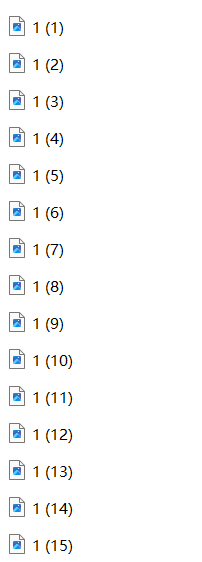
5、带自定义前缀、适配纯数字文件名的最终稳定脚本
# 自定义前缀,不需要就填 ""
$prefix = ""

# 存储文件与对应排序数字
$fileArray = @()
Get-ChildItem -File | ForEach-Object {
    $file = $_
    $baseName = $file.BaseName
    $sortNum = $null

    # 匹配 1 (xx) 格式
    if ($baseName -match '\((\d+)\)') {
        $sortNum = [int]$matches[1]
    }
    # 匹配纯数字文件名
    elseif ($baseName -match '^\d+$') {
        $sortNum = [int]$baseName
    }

    # 只把匹配成功的加入数组
    if ($sortNum -ne $null) {
        $fileArray += [PSCustomObject]@{
            SortNumber = $sortNum
            FileItem   = $file
        }
    }
}

# 按括号内数字升序排序
$sortedFiles = $fileArray | Sort-Object SortNumber

# 生成预览表格
$previewList = @()
for ($i = 0; $i -lt $sortedFiles.Count; $i++) {
    $seq = "{0:D3}" -f ($i + 1)
    $newFileName = "$prefix$seq$($sortedFiles[$i].FileItem.Extension)"
    $previewList += [PSCustomObject]@{
        原文件名 = $sortedFiles[$i].FileItem.Name
        新文件名 = $newFileName
    }
}

Write-Host "`n===== 改名预览列表(已按括号数字从小到大排序) ====="
$previewList | Format-Table -AutoSize
$confirm = Read-Host "确认执行改名输入 y,其他字符退出"
if ($confirm -ne "y") {
    Write-Host "操作已取消"
    pause
    exit
}

# 正式重命名
for ($i = 0; $i -lt $sortedFiles.Count; $i++) {
    $seq = "{0:D3}" -f ($i + 1)
    $newFileName = "$prefix$seq$($sortedFiles[$i].FileItem.Extension)"
    Rename-Item -Path $sortedFiles[$i].FileItem.FullName -NewName $newFileName
    Write-Host "$($sortedFiles[$i].FileItem.Name) → $newFileName"
}

Write-Host "`n所有文件排序并重命名完成"
pause