
20250320已更新:最新保姆级PVE8安装教程!虚拟机PCIE设备及SR-IOV核显直通,最多分配7个虚拟化单独核显!最强虚拟机!
去除 PVE 的登录弹窗
Proxmox VE 6.3 / 6.4 / 7.0 / 7.1 / 7.2 / 7.3 / 7.4 / 8.0 / 8.1 / 8.2 去掉未订阅的提示
sed -i_orig "s/data.status === 'Active'/true/g" /usr/share/pve-manager/js/pvemanagerlib.js
sed -i_orig "s/if (res === null || res === undefined || \!res || res/if(/g" /usr/share/javascript/proxmox-widget-toolkit/proxmoxlib.js
sed -i_orig "s/.data.status.toLowerCase() !== 'active'/false/g" /usr/share/javascript/proxmox-widget-toolkit/proxmoxlib.js
systemctl restart pveproxy
更换 PVE 源
可选,不换源也是可以的(推荐更换)
wget https://v2rayssr.com/tool/yuan.sh -O yuan.sh && chmod +x yuan.sh && ./yuan.sh直通 PCIe 设备
目前的 PVE 版本,默认开启了 PCIE 直通。
检验 PCIE 直通结果
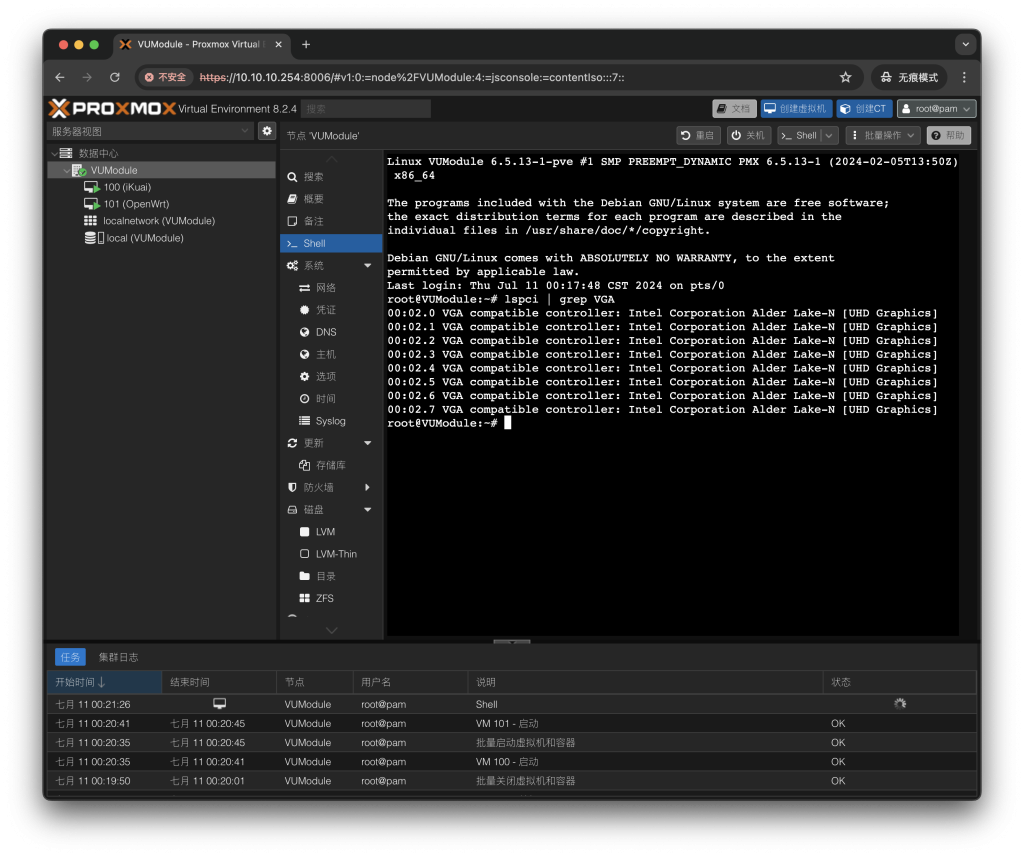
Shell 窗口输入 lspci ,回显如下(里面包含你所有的 PCIe 设备列表):
root@pve:~# lspci
0000:00:00.0 Host bridge: Intel Corporation Device 4640 (rev 02)
0000:00:01.0 PCI bridge: Intel Corporation 12th Gen Core Processor PCI Express x16 Controller #1 (rev 02)
0000:00:02.0 VGA compatible controller: Intel Corporation AlderLake-S GT1 (rev 0c)
0000:00:06.0 System peripheral: Intel Corporation RST VMD Managed Controller
0000:00:0a.0 Signal processing controller: Intel Corporation Platform Monitoring Technology (rev 01)
0000:00:0e.0 RAID bus controller: Intel Corporation Volume Management Device NVMe RAID Controller
0000:00:14.0 USB controller: Intel Corporation Alder Lake-S PCH USB 3.2 Gen 2x2 XHCI Controller (rev 11)
0000:00:14.2 RAM memory: Intel Corporation Alder Lake-S PCH Shared SRAM (rev 11)
0000:00:15.0 Serial bus controller: Intel Corporation Alder Lake-S PCH Serial IO I2C Controller #0 (rev 11)
0000:00:15.1 Serial bus controller: Intel Corporation Alder Lake-S PCH Serial IO I2C Controller #1 (rev 11)
0000:00:15.2 Serial bus controller: Intel Corporation Alder Lake-S PCH Serial IO I2C Controller #2 (rev 11)
0000:00:16.0 Communication controller: Intel Corporation Alder Lake-S PCH HECI Controller #1 (rev 11)
0000:00:17.0 System peripheral: Intel Corporation RST VMD Managed Controller
0000:00:1a.0 System peripheral: Intel Corporation RST VMD Managed Controller
0000:00:1b.0 PCI bridge: Intel Corporation Device 7ac0 (rev 11)
新建虚拟机,参数随意,用于检测 PCIE 是否直通成功。
来到虚拟机的硬件界面,点击添加 PCI 设备,选择 原始设备,参看 PCIE 设备列表,查看网口是否被划分为单个设备。
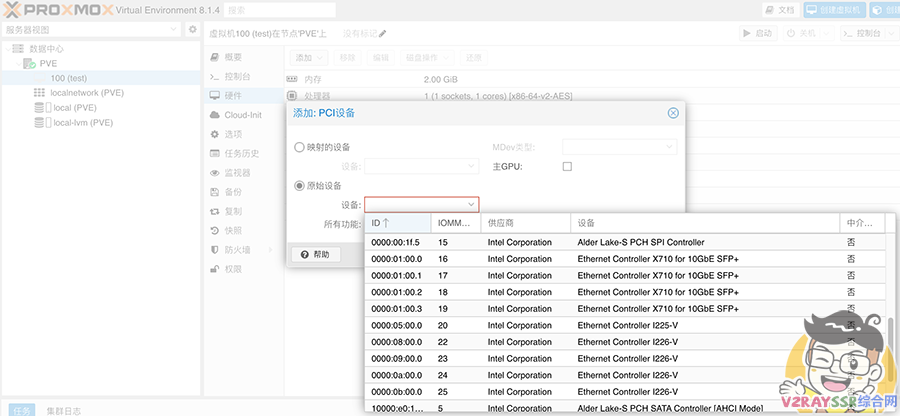
以上,为直通成功,可以看到两张四口的网卡,被划分为了八个网口。
开启核显的 SR-IOV
GitHub – strongtz/i915-sriov-dkms:Linux i915驱动的dkms模块,支持SR-IOV
原文参考
官方安装
1、安装构建工具:
apt install build-* dkms2、安装所需版本的内核和头部:(用于未签名内核)。
apt install proxmox-headers-6.14 proxmox-kernel-6.173、从发行页面下载 deb 包
wget -O /tmp/i915-sriov-dkms_2025.12.10_amd64.deb "https://github.com/strongtz/i915-sriov-dkms/releases/download/2025.12.10/i915-sriov-dkms_2025.12.10_amd64.deb"4、用dpkg安装deb包
dpkg -i /tmp/i915-sriov-dkms_2025.12.10_amd64.deb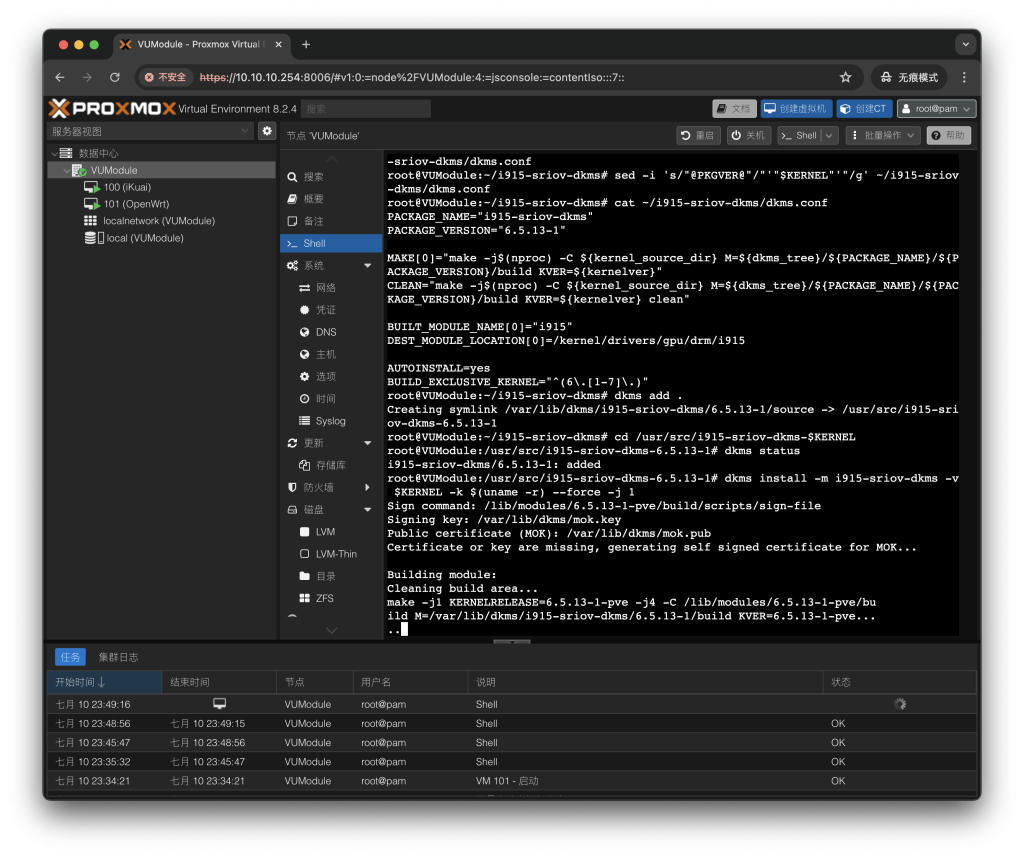
5、完成后,内核命令行需要调整:并更改为 ,或者如果你已经有其他参数,就添加它。
nano /etc/default/grubGRUB_CMDLINE_LINUX_DEFAULTintel_iommu=on i915.enable_guc=3 i915.max_vfs=7 module_blacklist=xe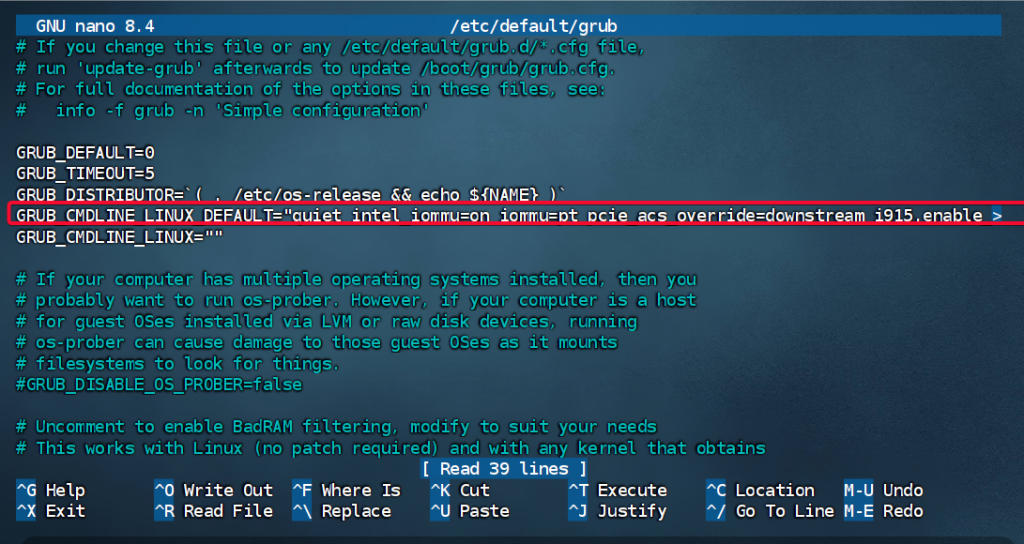
6、通过执行和更新
update-grubupdate-initramfs -u7、可选地钉住内核版本,并通过 更新启动配置。、
proxmox-boot-tool8、再次检查编译是否成功
dkms status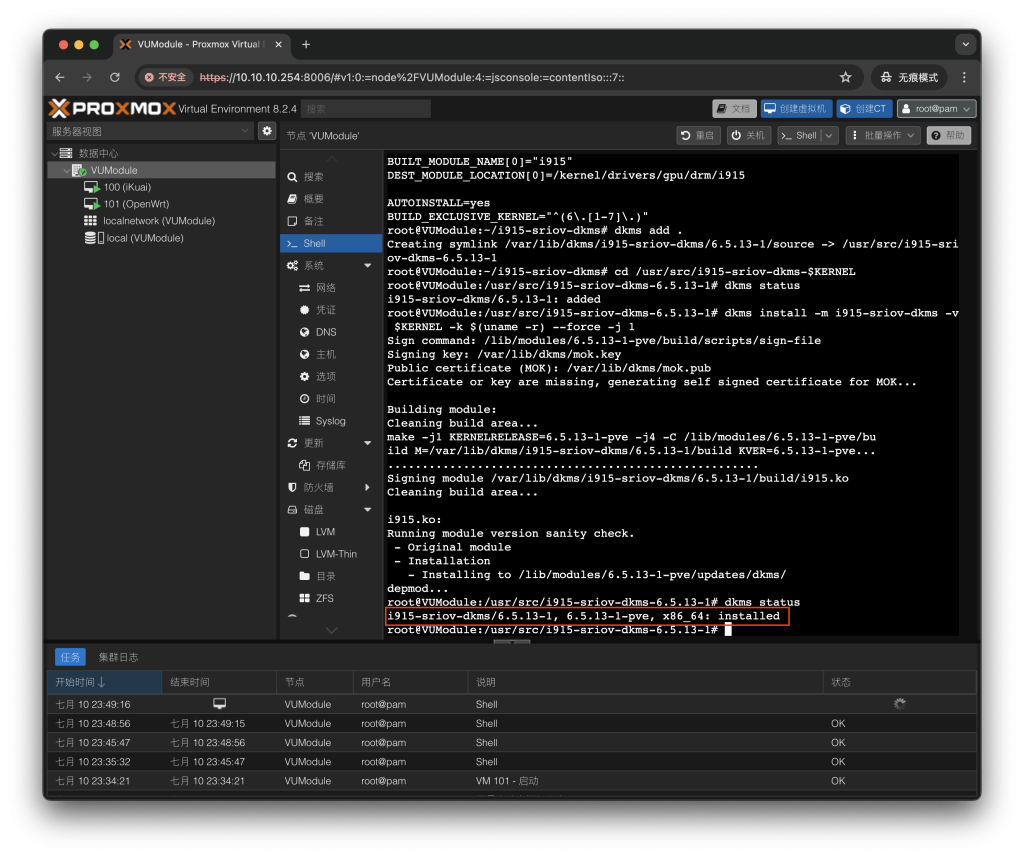
9、查询当前核显ID
lspci | grep VGA
01:00.0这里显示01:00.0,完整的PCI地址0000:01:00.0
10、为了启用VF,必须设置一个属性。安装,然后执行。修改下面代码的核显ID和虚拟核显数
echo "devices/pci0000:00/0000:01:00.0/sriov_numvfs = 7" > /etc/sysfs.conf
# 0000:01:00.0 这个修改为你的ID
# sriov_numvfs = 7里面的7修改为其他值,不要超过7
11、.重启PVE
reboot12.重启完检查是否开启成功
lspci | grep VGA